System Spec:
MB : GA F2A85X-UP4 (F4 Bios)
CPU : AMD APU A8 5600K
PSU : FSP 600 Aurum Gold
RAM: Kingston ValueRam KVR16N11/8
HDD : Hitachi HDS721050CLA362 500GB
GPU : Asus GeForce 650 Ti Boost 2GB
Cooler: Cooler Master Hyper EVO (Two fan) + Tunix TX4 TIM
Casing: XFive RTX 2
Fan: Enermax Magma X 3
Overclock info:
CPU: 43x multiplier, 1.463v Vcore (Turbo off, LLC Medium)
RAM: 1866 Mhz 12-12-12-32 timing 1.600v
NB: 1.200v
Temperature (Max): 64°C
Update 21 Nov 2013
Same spec as above except
Casing: CM Storm Scout II (7 fans)
Overclock:
i. CPU = 4.4Ghz, vcore 1.452v (LLC extreme, NB load Medium, 70°C max, OCCT 1hr++ stable)
ii. RAM = 10-11-10-24 37, 1.550v
Sunday, 4 August 2013
Tuesday, 26 March 2013
SANYO Xacti VPC CG20
SANYO Xacti VPC CG20: My experience
First day
So today my Xacti arrived. I did a little research about this dualcam (my own wording but Sanyo did advertised it as Dual Camera photos & videos). Nowadays it's called videocam and it got everything for my lack of photography skill needs. Full specification here but I doubt I'd be doing something that will reach this device full capability.
10 MP effective for photo and 8.3MP 1080 full HD for videos. All I need is 640x480px photo and video, this thing deliver more than enough for dummies. Yes, I was a bit rushing when deciding which's which but what's attractive about this dualcam are its spec (digital and physical wise) and price. Small enough for my small palm and at the right price, perhaps the cheapest of its kind. And, it's available here at the time of purchase 21st March 2013.
Accesories
A mini USB to USB and mini USB to AV out are supplied with the unit. A set of battery charger in 3 parts: The battery holder/charger, the power cord and the socket (optional and mine probably courtesy of the seller and because it has this SPT-2 type head). The lens cap comes with a separate nylon string which is great but I need to buy my own hand strap. A battery half charged enough for a preview (I dont think the seller will send you a dead battery).
Body casing
Initial inspection reveals this baby is made a lot out of plastic. As stated by other reviewers, the expansion card's lid is made of one piece of plastic, there's no flexible attachment at all unlike the battery's cover. That piece everybody should handle with care and a lot of patience. To access the battery bay, you need to use a little bit of force through your thumb to open the cover. I'd rather say everything is plastic!. Recyclable ones and if you're getting the first batch of recycled materials it's fine but middle and later batch, I bet it'll snap or break easily.
Battery
It's quite small the battery size, at least in my own experience. My Nokia 100 handphone's battery is bigger than that I assure. It says 190 pictures or 60 minutes recording time with 210 minutes continuous playback until the last bit of charge. So I think I should buy another battery as backup.
Button
Buttons on the upper back part are finely placed, fair for my thumb reach and well apart from each other. If you have a big hand and fingers I think it'll do quite just. 5 of them with labels easy enough for me to read/understand. In fact I tried them all without reading the manuals to get my first photos and videos.
Tuesday, 18 December 2012
Sony BRAVIA EX650 32" LED TV PC monitor experience
I don't think I'm a Sony fan but I have had my share owning and abusing Sony Walkman cassette player and PS2. Now this LED display, SONY Bravia KDL-32EX650. I bought this because:
i) 32", vs 17" my Dell CRT
ii) 1080p
iii) It's a Sony
Now I heard or read somewhere, Sony's display technology isn't the best up to date even during my time in the showroom my eyes rest more on Philip's and Samsung's. Samsung doesn't have 32" at that time while images on Philips's 32" look sharper, lighter in weight but it's missing the yellow tone compared to Sony's. Yes I will agree with you if you say I wasted my money on Sony because there're better displays in term of picture quality out there around the same or less price. Then again it's A Sony.
Picture quality. Mind you this is my first non-CRT display so I can't compare with any other in its class. Like I said in showroom I spent my time more on other brands but deep inside all those glittering are just traps. The TV settings could be tweaked and made the unwanted soon outdated looks brilliant, the sample image is not 1080p or the cable is too long/crappy that it affect picture quality. The only way to know is to bring them all into your own testing lab. VS crt for the first time I think this TV cannot outperform my CRT in picture quality if the sample is not 720p/1080p that is. Sitting like 2-2.5 feet away from the screen sometimes I feel the glare if the room is not well lit. 1920x1080 resolution 32bit and 60Hz, this TV delivers. You can view 2 pages of MS Word sheet at 100%, open 2 browsers and have then side by side.
The Internet thing that comes with this TV, no I don't use it yet so I don't know how fussy it is to set up. I use this as my PC monitor so I don't need to bother with the TV's network settings. The salesman said this TV needs Sony's own keypad/input device to type so you cant plug in your favorite keyboard/mouse. Plus, if you find a content you want to save, where it'll go? I wanted to blast the people behind the development of this TV but since I don't use the TV's internet option so I can't. Sony got PS3 so it knows how important internal data storage/manipulation is. Maybe in future it's useful for me. SO I say skip this TV if you wants for display purpose only.
I travel quite a lot and this 'MONITOR' travels quite a distance from 2-3 places with the longest is 130km with all the Malaysian road specs. It does take a big space in your car's backseat but as long as there's no one there it'll be fine. I do worry about the vibration/shock from the car might cause some defect but so far non. I put it in the box that comes with the TV and off I go to where I want.
SONY Bravia KDL-32EX650:
PRO:
1. 1080p ready and 1920x1080 resolution 32bit color and 60Hz works.
2. VS CRT you got more frontal space saving for your keyboard and mouse. D
3. Save your electric bill
4. So far no burn in/artifact. Gaming for more than 2 hours a day and up to 12 hours.
5. With one HDMI cable you get both picture and sound from PC. One less wire to worry about and maybe speakers if you travel with this thing a lot.
CON:
1. Your're an idiot for choosing this TV as monitor only. Don't be like me.
2. Sound is bad for a Sony. My last Sony Walkman's earphone sounded better.
3. Expensive
4. Doesn't come with free HDMI cable.
5. it's too long width-wise, it takes more than one seat at the back of your car.
Tuesday, 13 November 2012
Thursday, 16 September 2010
MSI 7636 H55M-E55 and KVR1333D3N9
I've overclocked Inte;'s i2 530 using this mb and memory also all across the way to 2000Mhz with BIOS version 1.5, 1.7 and latest MSI posting v1.8. I must admit that it's not that easy to reach a certain points, what more having a stable settings.
I suspect that the memory stick is showing signs of deterioration in function after much of over the spec settings and testings. It could be the motherboard also starts to suffer under heavy load. Now every settings BSOD now and then.
The obvious abnormality is the APS (Advance Power Switching) function seems to lost its mark with BIOS version 1.8. Somewhere, MSI engineers thought it's not worthy of overclocking witha motherboard that has an 'unstable' power supply since APS manages and regulates voltages to processor, northbridge and RAM, dropping or sustaining power according to system demand. Actually I quite like the APS, seeing lower than 1.000 volt idle on CPU-z but it also contributes to difficulty for system to recognize and be stable during overclocking.
Overall, maybe it's just the strain but all in all I'm quite pleased how this budget hardwares manage to give a few surprise.
I suspect that the memory stick is showing signs of deterioration in function after much of over the spec settings and testings. It could be the motherboard also starts to suffer under heavy load. Now every settings BSOD now and then.
The obvious abnormality is the APS (Advance Power Switching) function seems to lost its mark with BIOS version 1.8. Somewhere, MSI engineers thought it's not worthy of overclocking witha motherboard that has an 'unstable' power supply since APS manages and regulates voltages to processor, northbridge and RAM, dropping or sustaining power according to system demand. Actually I quite like the APS, seeing lower than 1.000 volt idle on CPU-z but it also contributes to difficulty for system to recognize and be stable during overclocking.
Overall, maybe it's just the strain but all in all I'm quite pleased how this budget hardwares manage to give a few surprise.
Wednesday, 15 September 2010
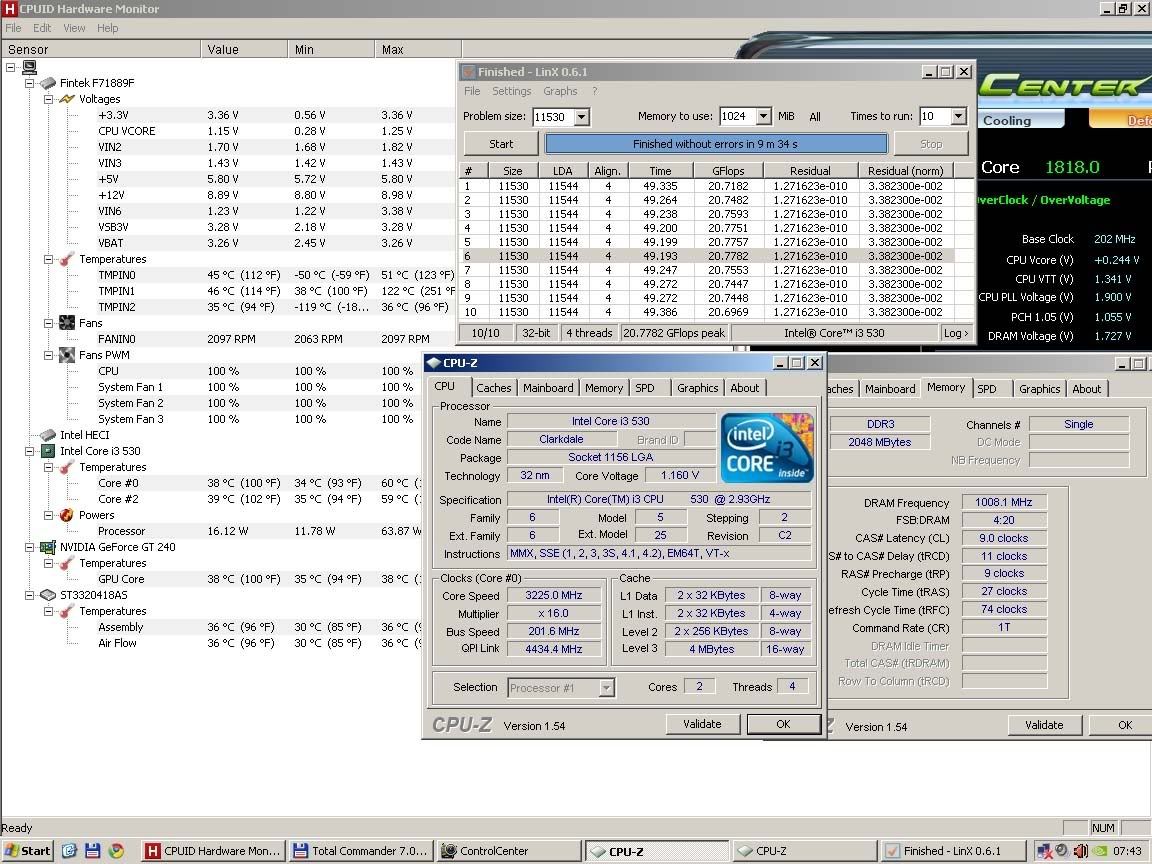
Kingston's Value Ram DDR3 1333Mhz (KVR1333D3N9/2G) overclock 2000Mhz
System spec as follows
=================
MB: MSI 7636 H55M-E33 AMI BIOS v1.5/v1.7
PSU: Cooler Master Extreme Power Plus 500W
CPU: Intel i3 530
RAM: 1 X KVR1333D3N9/2G (2GB)
HDD: 1 X ST3320418AS Seagate Barracuda 320GB
GPU: MSI 240 GT 512 DDR5
OS: WinXP SP3 32-bit
Settings: (As in BIOS)
=================
FSB: 202
CPU Multiplier = 16
DRAM Timing = 9-11-9-27
DRAM Multiplier = 5
Voltages:
=================
CPU: +0.240v
DRAM: +0.200v
VTT: +0.240v
Software for System Monitoring and Testing:
=================
CPU-Z v1.54
CPUid Hardware Monitor (HWMonitor v1.16)
LinX 0.6.1
MSI Control Center 1.0.18+
=================
MB: MSI 7636 H55M-E33 AMI BIOS v1.5/v1.7
PSU: Cooler Master Extreme Power Plus 500W
CPU: Intel i3 530
RAM: 1 X KVR1333D3N9/2G (2GB)
HDD: 1 X ST3320418AS Seagate Barracuda 320GB
GPU: MSI 240 GT 512 DDR5
OS: WinXP SP3 32-bit
Settings: (As in BIOS)
=================
FSB: 202
CPU Multiplier = 16
DRAM Timing = 9-11-9-27
DRAM Multiplier = 5
Voltages:
=================
CPU: +0.240v
DRAM: +0.200v
VTT: +0.240v
Software for System Monitoring and Testing:
=================
CPU-Z v1.54
CPUid Hardware Monitor (HWMonitor v1.16)
LinX 0.6.1
MSI Control Center 1.0.18+
Subscribe to:
Posts (Atom)